TikTok clips
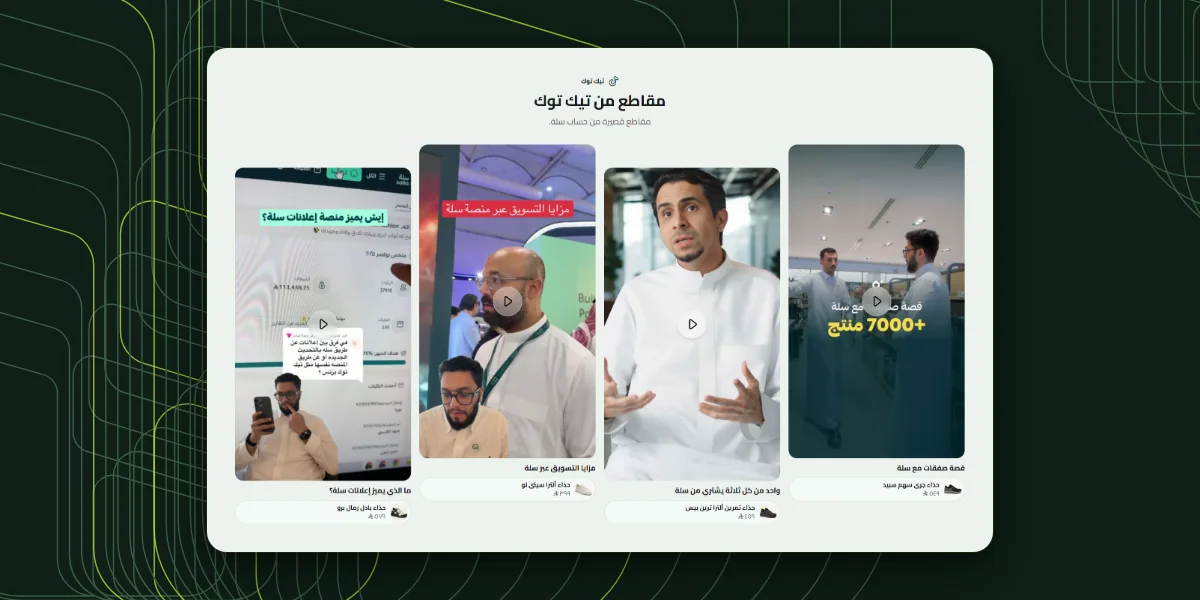
TikTok clips you pick here, each with its cover and product, played in place on a press; nothing loads from TikTok before.
Where it is in the Salla dashboard
- 1(المتجر وقنوات البيع)
- 2(تصميم المتجر)
- 3(إدارة الثيمات)
- 4(تخصيص)
- 5(صفحات المتجر)
- 6(عناصر الصفحة)
- 7(مقاطع تيك توك)
Element 47 of 50 in (Add a new element)
When to use it
Best for showing your TikTok clips in your store, with each clip's product if you want.
Clips that lead to their products
Pick a «Product» for each clip; it shows below with its picture, name and price, and opens its page.
Clips without products
Leave «Product» empty for general clips about your store, and give them just a «Title».
For the best result
- Upload a 1080 × 1920 «Cover» for each clip, since it is not taken from TikTok.
- Paste the clip's full link, since short links do not work.
- You can add up to 10 clips, shown in the order you set.
Watch the walkthrough
Walkthrough video coming soon
A short video that walks through the element inside the Salla dashboard. We will add it once Ultra’s options are final.
Pictures and tools
The size of each picture in this element, as the theme sets it, and a ready prompt for image tools.
(Cover)
Repeats for each item in “Clips”
1080 × 19209:16
Picture prompt
Pick the picture you want, then copy the prompt into an image tool with your product photo.
Paste the text into an image tool with your product photo and choose a 9:16 ratio. Then crop the picture to 1080 × 1920 px and upload it in “الغلاف” inside the “مقاطع تيك توك” element.
Create a picture for the "TikTok clips" element of an online store home page (picture: Cover, one per item in "Clips").
What the element does: TikTok clips you pick here, each with its cover and product, played in place on a press; nothing loads from TikTok before.
Aspect ratio: 9:16 (the final file is cropped to exactly 1080 x 1920 px).
Theme note for this picture: Recommended size: 1080 x 1920px. Portrait at 9:16 before playback; not taken from TikTok, whose picture expires in about two days.
Composition: keep the important subject in the centre; keep the outer 10% on every side free of detail, because the edges may be cropped on mobile.
Product: if I attach a product photo, use it exactly as it is: same shape, colours, label and logo. Do not redraw it or invent text on the packaging.
Style: realistic photography, soft natural light and shadow.
Colours: calm, muted and desaturated; no neon or saturated tones.
People: if any person appears, men only; otherwise no people.
Do not add any words, prices, logos or watermarks to the picture.
Example of this element in a store: https://cdn.salla.sa/form-builder/sM05U3EMFcJ1cQLUq77I0VwuKXjpkTdtruvgs6oB.webp
Settings
In the same order, with the same names, as in the Salla dashboard.
Options such as «Line above the title», «View all» and «Product source» are explained once on the Shared options page.
Line above the title السطر فوق العنوان
Type: TextDefault: Empty
Leave blank to hide it.
Eyebrow icon أيقونة السطر فوق العنوان
Type: Icon
Stands in place of the short line before the words. Leave blank to keep the line.
Title العنوان
Type: TextDefault: Our clips on TikTok
Description نص توضيحي
Type: Long textDefault: Follow what is new with us on TikTok.
Shown on two lines at most.
Clips المقاطع
Type: List of itemsDefault: Empty
Shown in your order, 1 to 10 clips.
Items: 1–10
Link الرابط
Type: LinkDefault: Empty
The clip’s full link, like tiktok.com/@store/video/123; short links do not work. Without it, the cover is a still picture.
Cover الغلاف
Type: ImageDefault: Empty
Recommended size: 1080 x 1920px. Portrait at 9:16 before playback; not taken from TikTok, whose picture expires in about two days.
Title العنوان
Type: TextDefault: Empty
Shown under the clip, and names its play button for a screen reader.
Product المنتج
Type: Picked from your storeDefault: Empty
Shown under the clip with its picture, name and price. Pressing it opens the product page.
(Advanced options)
At the bottom of the element’s settings, under (Advanced options).
Who sees it من يرى العنصر
Type: Choice listDefault: Everyone
Seen by everyone, signed-out visitors only, or signed-in customers only.
Options: Everyone, Signed-out visitors, Signed-in customers
Link name اسم الانتقال
Type: TextDefault: Empty
The name menus and buttons use to jump here.
CSS class فئة CSS
Type: TextDefault: Empty
Names to target this element from CSS (promo → ultra-u-promo). Separate them with a space.