Name meaning
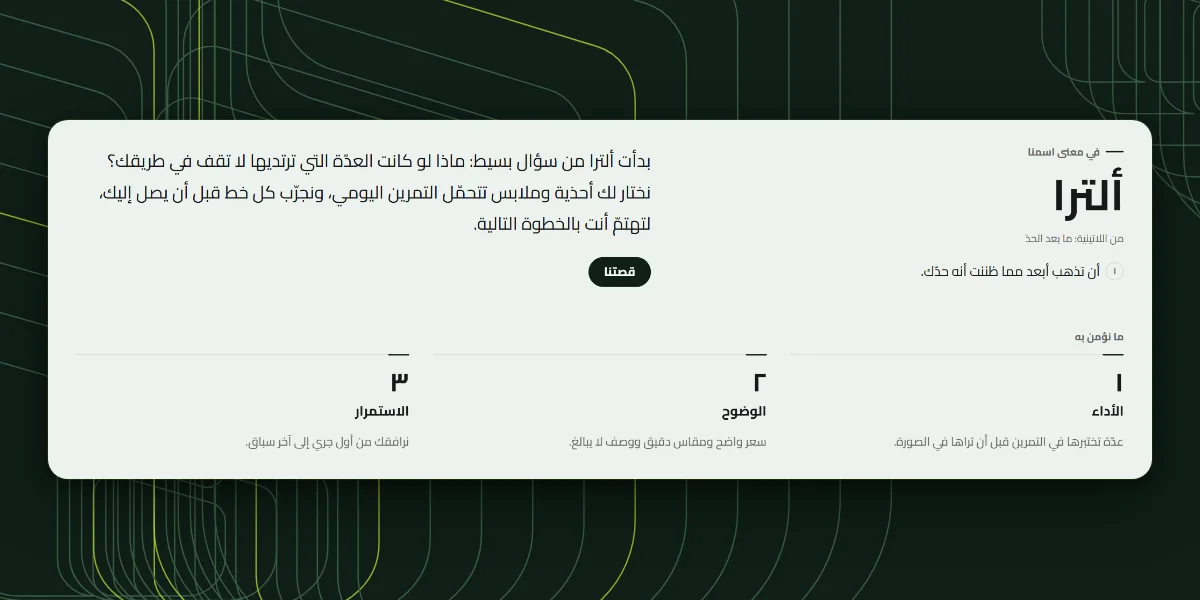
Your store’s name as a dictionary entry, origin and meaning, beside its story lit word by word on scroll, plus up to 3 values.
Where it is in the Salla dashboard
- 1(المتجر وقنوات البيع)
- 2(تصميم المتجر)
- 3(إدارة الثيمات)
- 4(تخصيص)
- 5(صفحات المتجر)
- 6(عناصر الصفحة)
- 7(معنى الاسم)
Element 10 of 50 in (Add a new element)
When to use it
Introduce your store's name, its origin, its story and the values behind it.
An Arabic name with a meaning
Fill in «Word origin» and «Word meaning» to show your store name like a dictionary entry.
A foreign or invented name
Leave «Word meaning» empty and the meaning and origin lines disappear. The word, story and values stay.
A way into your full story
Add «Button text» and «Button destination» to an info page. Or use «Link text» to jump to another element on the same page.
For the best result
- Keep «Story» to one short paragraph. If left empty, your store's «About» text appears.
- Add up to 3 values, each one or two words with a single line.
Watch the walkthrough
Walkthrough video coming soon
A short video that walks through the element inside the Salla dashboard. We will add it once Ultra’s options are final.
Settings
In the same order, with the same names, as in the Salla dashboard.
Options such as «Line above the title», «View all» and «Product source» are explained once on the Shared options page.
The word
Leave the meaning blank for a foreign or coined name.
Small line above the word السطر الصغير فوق الكلمة
Type: TextDefault: What our name means
Shown with the meaning; hidden when left blank.
Word الكلمة
Type: TextDefault: Empty
Leave blank to show your store’s name.
Word origin أصل الكلمة
Type: TextDefault: Empty
A line under the word, shown with the meaning.
Word meaning معنى الكلمة
Type: TextDefault: Empty
Left blank, the “What our name means” line, the origin and the meaning are hidden.
Story القصة
Type: Long textDefault: Empty
One short paragraph in large type, lit word by word on scroll. Left blank, the “About the store” text from your store settings shows.
What we believe
Values heading عنوان القيم
Type: TextDefault: What we believe
Hidden when left blank.
Values style شكل القيم
Type: Choice listDefault: Lines
Options: Lines, Cards
Values القيم
Type: List of itemsDefault: Empty
Items: 0–3
Value القيمة
Type: TextDefault: Empty
A word or two.
Text النص
Type: TextDefault: Empty
One line that explains the value.
Button target ربط الزر
Type: Choice listDefault: Page or product
Options: No link, Page or product, On-page element, Pop-up window
Button destination وجهة الزر
Type: Picked from your storeDefault: Empty
Leave blank to hide the button.
Shown when “Button target” is set to “Page or product”.
Target element link name اسم انتقال العنصر المقصود
Type: TextDefault: Empty
Copy it from the target element’s “Link name”, under “Advanced options”.
Shown when “Button target” is set to anything but “No link”.
Shown when “Button target” is set to anything but “Page or product”.
Button text نص الزر
Type: TextDefault: Read our story
The button shows when it has text and a destination.
Shown when “Button target” is set to anything but “No link”.
Link text نص الرابط
Type: TextDefault: Learn more
The link shows when it has both words and a destination.
Shown when “Link target” is set to anything but “No link”.
Link target ربط الرابط
Type: Choice listDefault: On-page element
Options: No link, Page or product, On-page element, Pop-up window
Link destination وجهة الرابط
Type: Picked from your storeDefault: Empty
Shown when “Link target” is set to “Page or product”.
Target element link name اسم انتقال العنصر المقصود
Type: TextDefault: Empty
Copy it from the target element’s “Link name”, under “Advanced options”.
Shown when “Link target” is set to anything but “No link”.
Shown when “Link target” is set to anything but “Page or product”.
(Advanced options)
At the bottom of the element’s settings, under (Advanced options).
Who sees it من يرى العنصر
Type: Choice listDefault: Everyone
Seen by everyone, signed-out visitors only, or signed-in customers only.
Options: Everyone, Signed-out visitors, Signed-in customers
Link name اسم الانتقال
Type: TextDefault: Empty
The name menus and buttons use to jump here.
CSS class فئة CSS
Type: TextDefault: Empty
Names to target this element from CSS (promo → ultra-u-promo). Separate them with a space.