Social accounts
Your store’s accounts in tabs; an account typed here wins over that platform’s link in your store settings.
Where it is in the Salla dashboard
- 1(المتجر وقنوات البيع)
- 2(تصميم المتجر)
- 3(إدارة الثيمات)
- 4(تخصيص)
- 5(صفحات المتجر)
- 6(عناصر الصفحة)
- 7(حسابات التواصل)
Element 46 of 50 in (Add a new element)
When to use it
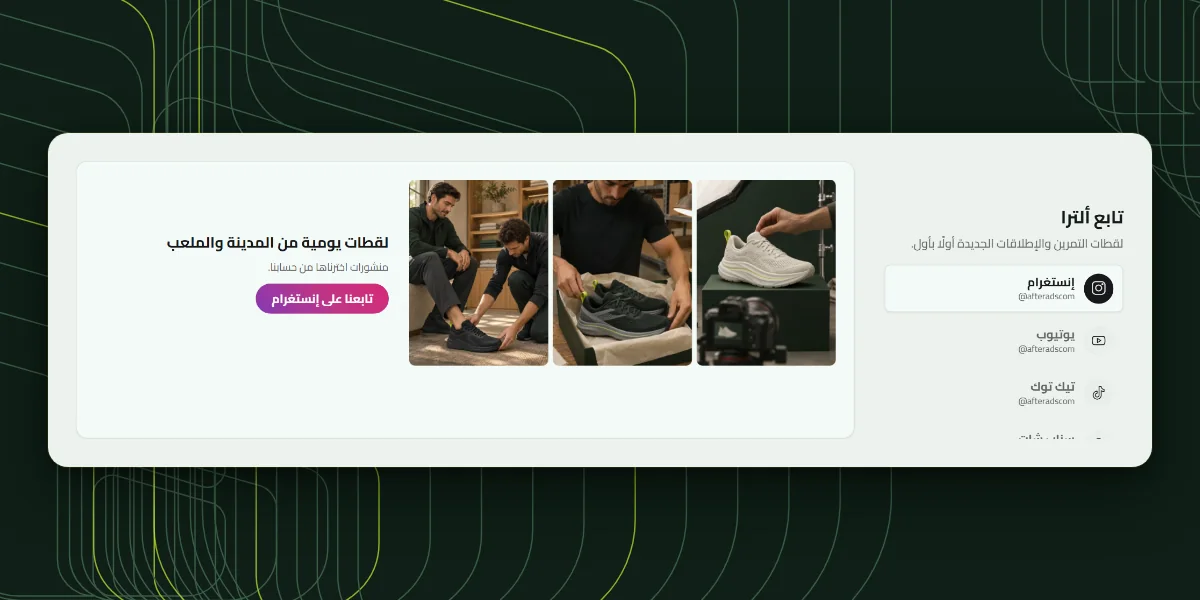
Invite customers to follow your store's accounts, with a glimpse of what you post on each platform.
An Instagram preview
Add up to 3 posts in «Picked posts», each with its picture and link.
Your channel's latest videos
Enter your «YouTube channel ID» to show a player that opens on your newest video.
Your Snapchat code on computers
Upload your «Snapcode» as Snapchat gives it, and it shows on computers. Phones get the follow button.
For the best result
- Post pictures and «TikTok clips» covers 1080 × 1440, a 3:4 ratio.
- Leave the account fields empty if your store's social links are correct; they are read from there.
- Write one line per platform saying what you post, and set «Platform shown first» to where you post most.
Watch the walkthrough
Walkthrough video coming soon
A short video that walks through the element inside the Salla dashboard. We will add it once Ultra’s options are final.
Pictures and tools
The size of each picture in this element, as the theme sets it, and a ready prompt for image tools.
(Image)
Repeats for each item in “Picked posts”
1080 × 14403:4
(Cover)
Repeats for each item in “TikTok clips”
1080 × 14403:4
(Snapcode)
Any size; the picture is shown whole, never cropped.
Picture prompt
Pick the picture you want, then copy the prompt into an image tool with your product photo.
Paste the text into an image tool with your product photo and choose a 3:4 ratio. Then crop the picture to 1080 × 1440 px and upload it in “الصورة” inside the “حسابات التواصل” element.
Create a picture for the "Social accounts" element of an online store home page (picture: Image, one per item in "Picked posts").
What the element does: Your store’s accounts in tabs; an account typed here wins over that platform’s link in your store settings.
Aspect ratio: 3:4 (the final file is cropped to exactly 1080 x 1440 px).
Theme note for this picture: Recommended size: 1080 x 1440px. Shows at 3:4.
Composition: keep the important subject in the centre; keep the outer 10% on every side free of detail, because the edges may be cropped on mobile.
Product: if I attach a product photo, use it exactly as it is: same shape, colours, label and logo. Do not redraw it or invent text on the packaging.
Style: realistic photography, soft natural light and shadow.
Colours: calm, muted and desaturated; no neon or saturated tones.
People: if any person appears, men only; otherwise no people.
Do not add any words, prices, logos or watermarks to the picture.
Example of this element in a store: https://cdn.salla.sa/form-builder/nU1hWUzbtOqQ4NAAsNl1yKJzxXM84f1i4bvtSefh.webp
Settings
In the same order, with the same names, as in the Salla dashboard.
Options such as «Line above the title», «View all» and «Product source» are explained once on the Shared options page.
Title العنوان
Type: TextDefault: Empty
Leave blank to show “Follow your store name wherever you like”.
Description نص توضيحي
Type: Long textDefault: Choose your platform and see what we post there before you follow.
Shown on two lines at most.
Platform shown first المنصة المفتوحة أولًا
Type: Choice listDefault: Instagram
With no account for it, the element opens on the first tab.
Options: Instagram, YouTube, TikTok, Snapchat
Instagram account حساب إنستغرام
Type: TextDefault: Empty
Name or link of the account; it wins over your store settings’ social link, which is used if this is blank or invalid.
Instagram content محتوى إنستغرام
Type: TextDefault: Pictures of our products and what has just arrived.
A line beside the follow button saying what you post there. Leave blank to hide it.
Picked posts المنشورات المختارة
Type: List of itemsDefault: Empty
Up to 3 posts, marked as picked. Leave empty to show only the line and the follow button.
Items: 0–3
Image الصورة
Type: ImageDefault: Empty
Recommended size: 1080 x 1440px. Shows at 3:4.
Post link رابط المنشور
Type: LinkDefault: Empty
The post’s Instagram link. Leave blank to open your account instead.
YouTube
YouTube account حساب يوتيوب
Type: TextDefault: Empty
Name or link of the account; it wins over your store settings’ social link, which is used if this is blank or invalid.
YouTube content محتوى يوتيوب
Type: TextDefault: Detailed reviews and ways to use our products.
A line beside the follow button saying what you post there. Leave blank to hide it.
YouTube channel ID معرّف قناة يوتيوب
Type: TextDefault: Empty
Starts with UC and has 24 characters. Leave blank to show only the line and the subscribe button.
TikTok
TikTok account حساب تيك توك
Type: TextDefault: Empty
Name or link of the account; it wins over your store settings’ social link, which is used if this is blank or invalid.
TikTok content محتوى تيك توك
Type: TextDefault: Our products in short clips.
A line beside the follow button saying what you post there. Leave blank to hide it.
TikTok clips مقاطع تيك توك
Type: List of itemsDefault: Empty
Up to 3 clips, each shown by its cover and opening its link. Leave empty to show only the line and the follow button.
Items: 0–3
Cover الغلاف
Type: ImageDefault: Empty
Recommended size: 1080 x 1440px. Shows at 3:4.
Post link رابط المنشور
Type: LinkDefault: Empty
The clip’s TikTok link. If it is not a clip link, a press opens your account.
Snapchat
Snapchat account حساب سناب شات
Type: TextDefault: Empty
Name or link of the account; it wins over your store settings’ social link, which is used if this is blank or invalid.
Snapchat content محتوى سناب شات
Type: TextDefault: Our news and offers as they happen.
A line beside the follow button saying what you post there. Leave blank to hide it.
Snapcode رمز سناب شات
Type: ImageDefault: Empty
The code image as Snapchat gives it, shown unedited on desktop. Leave blank to show only the mobile button.
Show the code on desktop إظهار الرمز على الكمبيوتر
Type: SwitchDefault: On
Works with the uploaded code. When off, the mobile button shows on every device.
(Advanced options)
At the bottom of the element’s settings, under (Advanced options).
Who sees it من يرى العنصر
Type: Choice listDefault: Everyone
Seen by everyone, signed-out visitors only, or signed-in customers only.
Options: Everyone, Signed-out visitors, Signed-in customers
Link name اسم الانتقال
Type: TextDefault: Empty
The name menus and buttons use to jump here.
CSS class فئة CSS
Type: TextDefault: Empty
Names to target this element from CSS (promo → ultra-u-promo). Separate them with a space.