Number counter
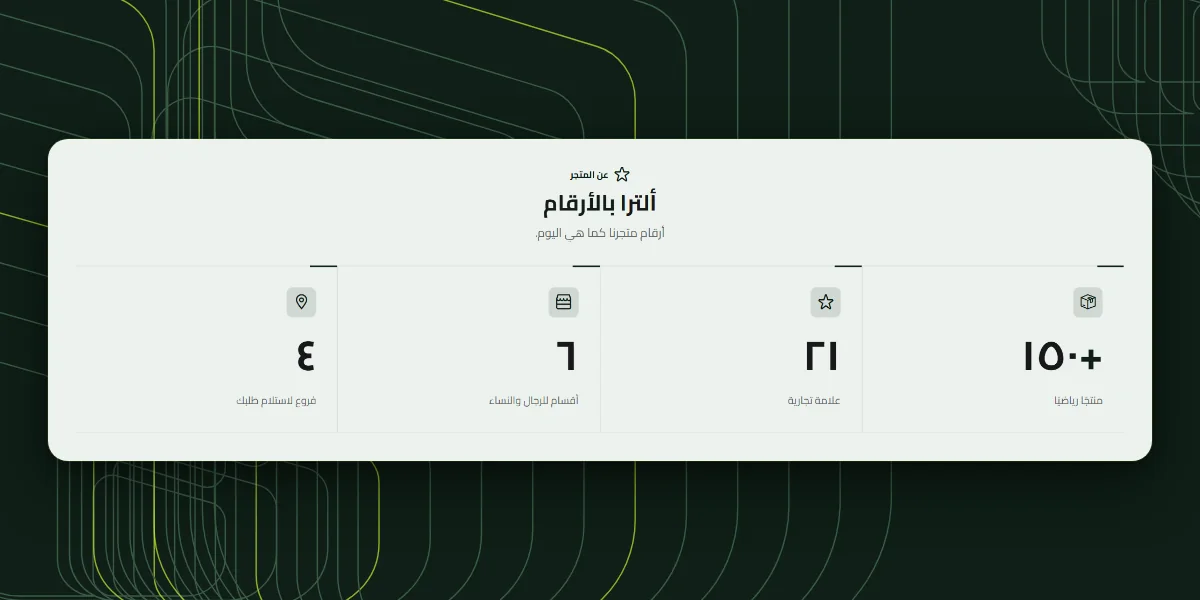
The numbers you type, in one row, each with an icon or stars and a short caption; the digits spin into place when it appears.
Where it is in the Salla dashboard
- 1(المتجر وقنوات البيع)
- 2(تصميم المتجر)
- 3(إدارة الثيمات)
- 4(تخصيص)
- 5(صفحات المتجر)
- 6(عناصر الصفحة)
- 7(عدّاد الأرقام)
Element 40 of 50 in (Add a new element)
When to use it
Show your store's numbers, such as orders or customer rating, in a single row.
Milestone numbers
Pick «Count» in «Type» and add + in «Before the number» or «thousand» in «After the number».
Your store rating
Pick «Rating out of 5» and enter a number like 4.9; stars appear with «out of 5» after it.
Years in business
Enter the number of years with «years» in «After the number», and pick an «Icon» from Salla's icons.
For the best result
- Add up to 6 stats, each with a «Caption» under the number.
- Write thousands with «thousand» after the number instead of long zeros.
- Use real numbers you can back up.
Watch the walkthrough
Walkthrough video coming soon
A short video that walks through the element inside the Salla dashboard. We will add it once Ultra’s options are final.
Settings
In the same order, with the same names, as in the Salla dashboard.
Options such as «Line above the title», «View all» and «Product source» are explained once on the Shared options page.
Line above the title السطر فوق العنوان
Type: TextDefault: Empty
Leave blank to hide it.
Eyebrow icon أيقونة السطر فوق العنوان
Type: Icon
Stands in place of the short line before the words. Leave blank to keep the line.
Title العنوان
Type: TextDefault: Empty
Description نص توضيحي
Type: Long textDefault: Empty
Shown on two lines at most.
Stats الإحصائيات
Type: List of itemsDefault: Empty
Items: 2–6
Type النوع
Type: Choice listDefault: Count
A rating shows stars in the icon’s place and writes “out of 5” after the number.
Options: Count, Rating out of 5
Number الرقم
Type: TextDefault: Empty
In digits; a fraction such as 4.9 is fine. Thousands read best as “thousand” after the number; a long number shrinks to fit.
Before the number قبل الرقم
Type: TextDefault: Empty
Optional, such as +, which a screen reader reads as “more than”.
Shown when “Type” is set to “Count”.
After the number بعد الرقم
Type: TextDefault: Empty
Optional, such as thousand or years.
Shown when “Type” is set to “Count”.
Icon الأيقونة
Type: Icon
Optional, from Salla’s icons.
Shown when “Type” is set to “Count”.
Caption الوصف
Type: TextDefault: Empty
Shown under the number.
(Advanced options)
At the bottom of the element’s settings, under (Advanced options).
Who sees it من يرى العنصر
Type: Choice listDefault: Everyone
Seen by everyone, signed-out visitors only, or signed-in customers only.
Options: Everyone, Signed-out visitors, Signed-in customers
Link name اسم الانتقال
Type: TextDefault: Empty
The name menus and buttons use to jump here.
CSS class فئة CSS
Type: TextDefault: Empty
Names to target this element from CSS (promo → ultra-u-promo). Separate them with a space.