Live support
A floating chat of your questions and answers, ending in a channel you choose where customers send their own message; only the first placed shows.
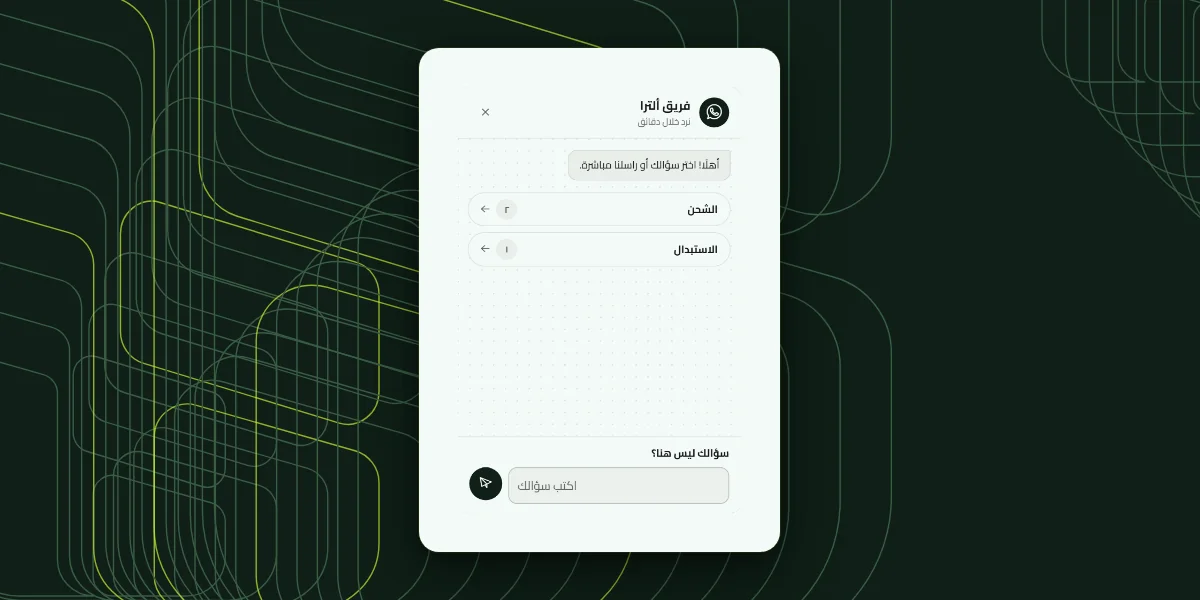
Where it is in the Salla dashboard
- 1(المتجر وقنوات البيع)
- 2(تصميم المتجر)
- 3(إدارة الثيمات)
- 4(تخصيص)
- 5(صفحات المتجر)
- 6(عناصر الصفحة)
- 7(دعم مباشر)
Element 43 of 50 in (Add a new element)
When to use it
Best for answering your customers' most common questions, then sending them to one contact channel.
Questions in groups
Give several questions the same «Group name», such as shipping or returns, and they show together in one group.
The contact channel you prefer
In «Contact channel», choose WhatsApp, Telegram, Messenger, Instagram, a phone call or email.
A welcome in your team's name
Edit «Team name», «Line under the name» and «Greeting» to match your store's tone.
For the best result
- If you leave «Contact number or account» empty, your store's details for that channel are used.
- Write the number with the country code, such as 966500000000.
- Add the element once; if it is repeated, only the first one shows.
Watch the walkthrough
Walkthrough video coming soon
A short video that walks through the element inside the Salla dashboard. We will add it once Ultra’s options are final.
Settings
In the same order, with the same names, as in the Salla dashboard.
Team name اسم الفريق
Type: TextDefault: Store team
Shown at the top of the chat.
Line under the name السطر تحت الاسم
Type: TextDefault: Ready answers to what customers ask us most
Greeting رسالة الترحيب
Type: Long textDefault: Welcome! Here are our answers to what we are asked most. Choose your question.
The first message in the chat.
Questions الأسئلة
Type: List of itemsDefault: Empty
Items: 1–10
Question السؤال
Type: TextDefault: Empty
Shown as a suggestion the customer taps, then as their message.
Answer الإجابة
Type: Long textDefault: Empty
Group name اسم المجموعة
Type: TextDefault: Empty
Questions with the exact same name show together in one group the customer opens first; with none, outside the groups.
Contact channel قناة التواصل
Type: Choice listDefault: WhatsApp
Opened by the chat’s last button; it carries the customer’s message ready, except on Instagram and phone calls.
Options: WhatsApp, Telegram, Messenger, Instagram, Phone call, Email
Contact number or account رقم أو حساب التواصل
Type: TextDefault: Empty
A number with country code (e.g. 966500000000), a username (e.g. @mystore) or an email, per channel. Leave blank to use your store’s details for it.
(Advanced options)
At the bottom of the element’s settings, under (Advanced options).
Who sees it من يرى العنصر
Type: Choice listDefault: Everyone
Seen by everyone, signed-out visitors only, or signed-in customers only.
Options: Everyone, Signed-out visitors, Signed-in customers
Link name اسم الانتقال
Type: TextDefault: Empty
The name menus and buttons use to jump here.
CSS class فئة CSS
Type: TextDefault: Empty
Names to target this element from CSS (promo → ultra-u-promo). Separate them with a space.