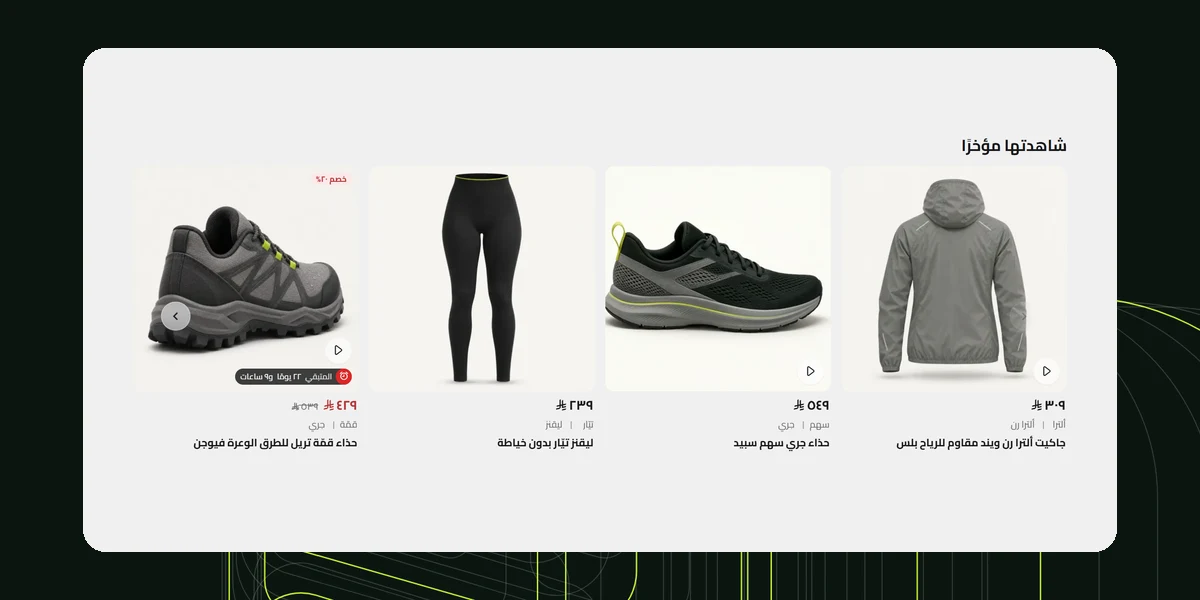
Recently viewed
The products this customer opened last, newest first, hidden until they open one; it loads late, so place it after the third element.
Where it is in the Salla dashboard
- 1(المتجر وقنوات البيع)
- 2(تصميم المتجر)
- 3(إدارة الثيمات)
- 4(تخصيص)
- 5(صفحات المتجر)
- 6(عناصر الصفحة)
- 7(شاهدتها مؤخرًا)
Element 37 of 50 in (Add a new element)
When to use it
Brings back the products the customer opened, so they pick up where they left off without searching again.
A quick way back to a product they hesitated on
Shows the products the customer opened last, newest first. Pick 4, 8 or 12 in «How many».
A title in your store’s voice
Write a title such as «Products you liked» in «Title». Left blank, it shows «Recently viewed».
Only for signed-in customers
Choose «Signed-in customers» in «Who sees it» to show it to your signed-in customers only.
For the best result
- Place it after the third element on the page, since it loads after the rest of the page.
- It stays hidden until the customer opens a product, so a first visit shows no empty space.
- The cart shows the same products under it; turn off «Show Recently viewed» in the cart settings to hide them.
Watch the walkthrough
Walkthrough video coming soon
A short video that walks through the element inside the Salla dashboard. We will add it once Ultra’s options are final.
Settings
In the same order, with the same names, as in the Salla dashboard.
Title العنوان
Type: TextDefault: Empty
Leave blank to show “Recently viewed”.
How many العدد
Type: Choice listDefault: 12 products
How many of the customer’s latest products to show, at most.
Options: 4 products, 8 products, 12 products
(Advanced options)
At the bottom of the element’s settings, under (Advanced options).
Who sees it من يرى العنصر
Type: Choice listDefault: Everyone
Seen by everyone, signed-out visitors only, or signed-in customers only.
Options: Everyone, Signed-out visitors, Signed-in customers
Link name اسم الانتقال
Type: TextDefault: Empty
The name menus and buttons use to jump here.
CSS class فئة CSS
Type: TextDefault: Empty
Names to target this element from CSS (promo → ultra-u-promo). Separate them with a space.