Contact form
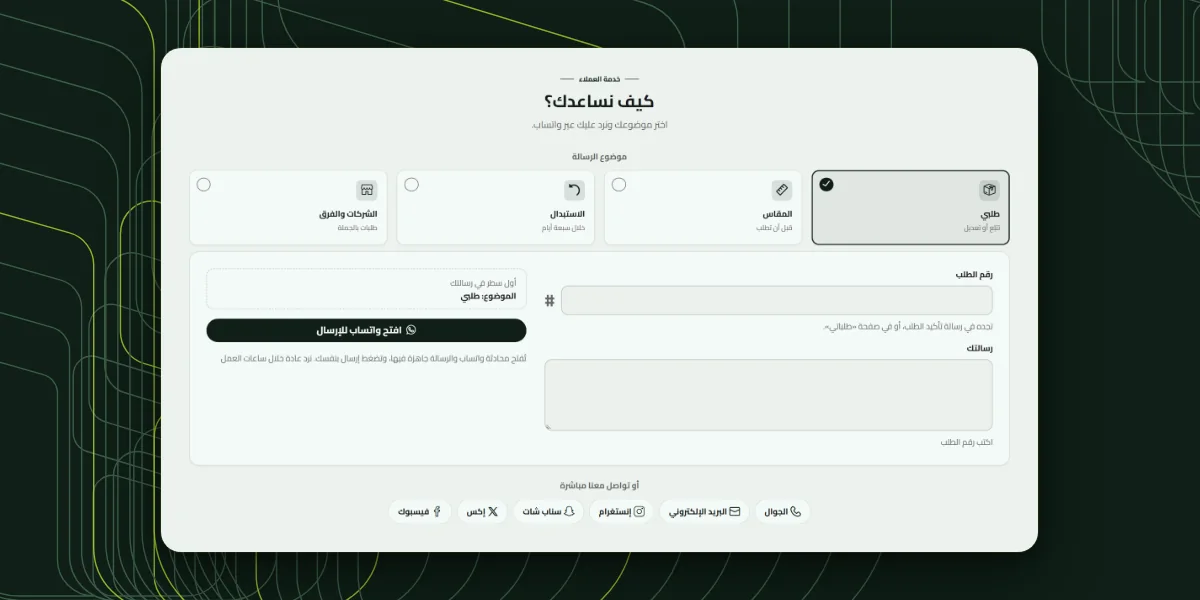
A form where the customer picks a topic first, then sends the message from their own email or WhatsApp, above your store’s contact channels.
Where it is in the Salla dashboard
- 1(المتجر وقنوات البيع)
- 2(تصميم المتجر)
- 3(إدارة الثيمات)
- 4(تخصيص)
- 5(صفحات المتجر)
- 6(عناصر الصفحة)
- 7(نموذج التواصل)
Element 42 of 50 in (Add a new element)
When to use it
Prepare the customer's message by topic, so they send it to you by email or WhatsApp.
Order messages with the order number
Add an orders topic and set «Order number» to «Required», so the message arrives with the order number.
Answers before sending
Add «Suggested questions» with answers, and customers see the two closest to what they type.
WhatsApp instead of email
Pick «WhatsApp» in «Sending method» and enter the «WhatsApp number for messages» with the country code.
For the best result
- Add 2 to 6 topics, each with its own «Message hint».
- Type the topic name in the question's «Topic» field so it moves up when that topic is chosen.
- Customers send the message from their own app; the store does not receive it from the page.
Watch the walkthrough
Walkthrough video coming soon
A short video that walks through the element inside the Salla dashboard. We will add it once Ultra’s options are final.
Settings
In the same order, with the same names, as in the Salla dashboard.
Options such as «Line above the title», «View all» and «Product source» are explained once on the Shared options page.
Line above the title السطر فوق العنوان
Type: TextDefault: Empty
Leave blank to hide it.
Eyebrow icon أيقونة السطر فوق العنوان
Type: Icon
Stands in place of the short line before the words. Leave blank to keep the line.
Title العنوان
Type: TextDefault: How can we help today?
Description نص توضيحي
Type: Long textDefault: Choose your message’s topic first, and we will prepare what we need to answer you the first time.
Shown on two lines at most.
Sending
Sending method طريقة الإرسال
Type: Choice listDefault: Email
The customer’s message opens ready in their mail app or WhatsApp for them to send; the page itself sends nothing.
Options: Email, WhatsApp
Email for messages البريد الإلكتروني للرسائل
Type: TextDefault: Empty
Leave blank to use the email in your store’s details.
WhatsApp number for messages رقم واتساب للرسائل
Type: TextDefault: Empty
Include the country code. Leave blank to use the WhatsApp number in your store’s details.
Reply time line سطر وقت الرد
Type: TextDefault: Empty
Shown under the send button. Leave blank to hide.
Topics المواضيع
Type: List of itemsDefault: Empty
Items: 2–6
Icon الأيقونة
Type: Icon
Shown on the topic’s card.
Name الاسم
Type: TextDefault: Empty
Shown on the card; it starts the email subject or the WhatsApp message.
Small line سطر صغير
Type: TextDefault: Empty
Shown under the topic name on the card.
Order number رقم الطلب
Type: Choice listDefault: Not shown
The order number box for this topic. “Optional” suits a customer who was charged but has no order.
Options: Not shown, Optional, Required
Show ticket line إظهار سطر التذاكر
Type: SwitchDefault: Off
Points the customer to the help button to open a ticket. Appears only when your store’s ticket system is on.
Message hint تلميح الرسالة
Type: TextDefault: Empty
Shown under the message box when this topic is chosen.
Suggested questions الأسئلة المقترحة
The two questions closest to what the customer types appear under the message box; they are this element’s own.
Type: List of itemsDefault: Empty
Items: 1–12
Question السؤال
Type: TextDefault: Empty
Answer الإجابة
Type: Long textDefault: Empty
Topic الموضوع
Type: TextDefault: Empty
The topic name from “Topics”, with the exact same letters; this question then comes first for it.
(Advanced options)
At the bottom of the element’s settings, under (Advanced options).
Who sees it من يرى العنصر
Type: Choice listDefault: Everyone
Seen by everyone, signed-out visitors only, or signed-in customers only.
Options: Everyone, Signed-out visitors, Signed-in customers
Link name اسم الانتقال
Type: TextDefault: Empty
The name menus and buttons use to jump here.
CSS class فئة CSS
Type: TextDefault: Empty
Names to target this element from CSS (promo → ultra-u-promo). Separate them with a space.